> ## Documentation Index
> Fetch the complete documentation index at: https://docs.ntop.com/llms.txt
> Use this file to discover all available pages before exploring further.
# Ramp
***
## About this Block
The Ramp block allows you to scale values from one range, within the input min and max, to its relative value within an output range.
For example, an input value of 5 ramped from an input range of 0 to 10 results in 50 when the output range is 0 to 100. The input value and the ramp output are both halfway between their respective min and max bounds.
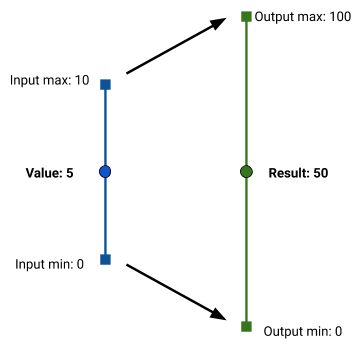
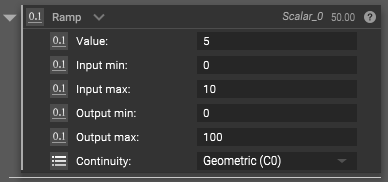
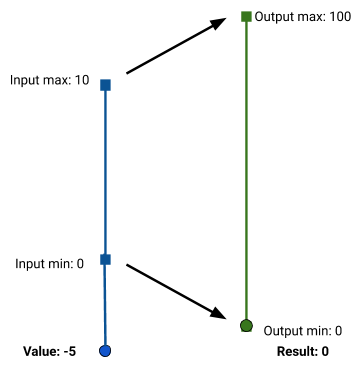
When the input value falls below the Input min or above the Input max, the output value is set to the Output min, or Output max, respectively. This is referred to as a clamped bound.
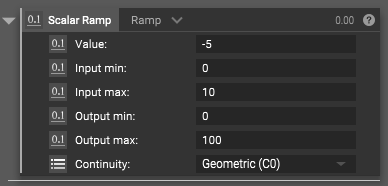
The ramp process can be performed on singular scalar values, or entire scalar fields. To change the block’s type, click on the chevron next to the ‘Ramp’ block title, and select from the drop-down menu.
When ramping with scalar fields, we’re able to take the qualitative shape of an input field and give it new quantitative values. In the example below, we’ve effectively scaled the distance field from a plane up by a factor of 2.
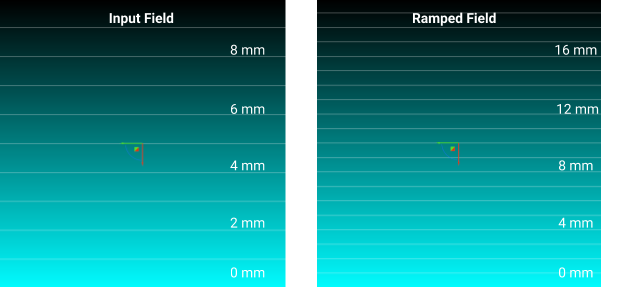
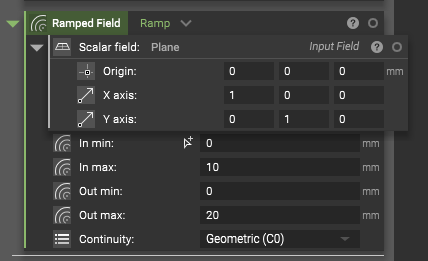
Ramping can be used in conjunction with any block that accepts a scalar field input in order to make the effect of that block spatially varying. In the example below, we thicken a cylinder by an amount that changes based on the distance from a plane.
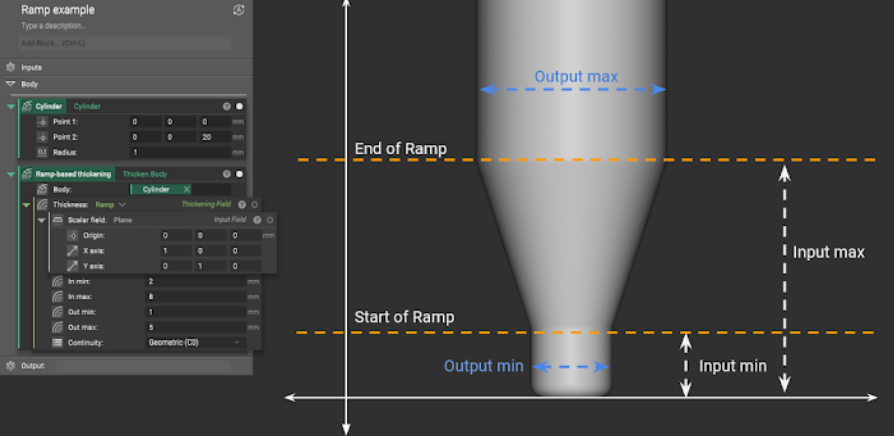
The units of the input value, input min, and input max, must all match. The output min and max must also match each other, but they can have a different set of units from the inputs. This allows you to convert, for example, a stress field in Pa into a field defining a lattice thickness in mm.
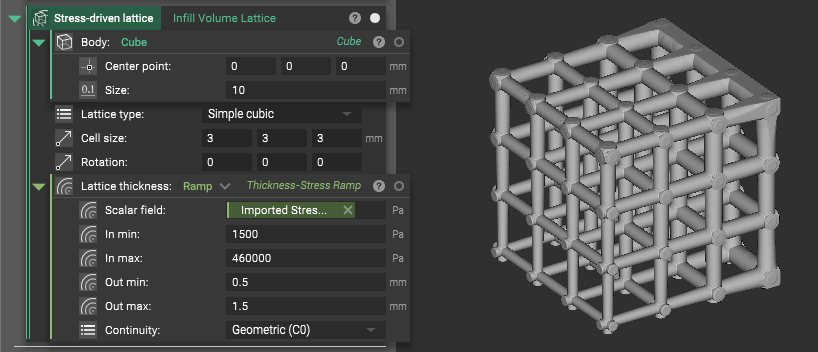
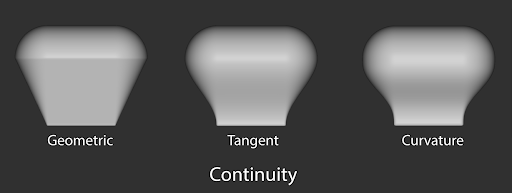
The Continuity input dictates how values are interpolated between the min and max ranges. The images below show the difference between the three options.
## Example File
*This file demonstrates several uses of the Ramp block.*
Download Example: [Ramp](https://storage.googleapis.com/files-learn/static/ExtendedBlockDocs/Ramp.ntop)
***
Scalar, Scalar, Scalar, Scalar, Scalar, Continuity Enum
Ramp scalar value in one range to its relative position in another range, with clamped bounds.
### Inputs
| Name | Type | Description |
| - | - | - |
| Value | [Scalar](../../../../block-documentation/types/scalar) | Value to ramp. |
| Input min | [Scalar](../../../../block-documentation/types/scalar) | Input range min value. |
| Input max | [Scalar](../../../../block-documentation/types/scalar) | Input range max value. |
| Output min | [Scalar](../../../../block-documentation/types/scalar) | Output range min clamp value. |
| Output max | [Scalar](../../../../block-documentation/types/scalar) | Output range max clamp value. |
| Continuity | Continuity Enum | Smoothness of the ramp by continuity order.The higher the order, the smoother the transition. |
### Outputs
| Type |
| - |
| [Scalar](../../../../block-documentation/types/scalar) |
***
Scalar, Scalar, Scalar, Scalar, Scalar, Easing Enum, Easing Direction Enum, Scalar, 6.2.0
Ramp a scalar value in one range to its relative position in another range, with clamped bounds and a choice of easing function applied to the start of the transition, its end, or both.
### Inputs
| Name | Type | Description |
| - | - | - |
| Value | [Scalar](../../../../block-documentation/types/scalar) | Value to ramp. |
| In min | [Scalar](../../../../block-documentation/types/scalar) | Input range min value. |
| In max | [Scalar](../../../../block-documentation/types/scalar) | Input range max value. |
| Out min | [Scalar](../../../../block-documentation/types/scalar) | Output range min clamp value. |
| Out max | [Scalar](../../../../block-documentation/types/scalar) | Output range max clamp value. |
| Easing function | Easing Enum | Function used to shape the transition. Geometric (G0) leaves it linear. Tangent (G1) and Curvature (G2) meet the clamped region with matching tangent and matching curvature, reproducing the Continuity option of the other Ramp overloads when Easing Direction is Ease In and Out. Power flattens the eased end more the larger Function Parameter is, where 2 is quadratic and 3 is cubic. Sinusoidal is a quarter cosine and falls between G1 and G2. Circular follows a quarter circle and arrives vertically at the opposite end. Exponential is the only option that does not leave the eased end perfectly flat, and its Function Parameter sets how sharply it accelerates. |
| Easing direction | Easing Direction Enum | Which end of the transition the easing function shapes. Ease In smooths the start and leaves the end sharp, Ease Out does the reverse, and Ease In and Out smooths both. |
| Function parameter | [Scalar](../../../../block-documentation/types/scalar) | Shapes the selected Easing Function: the exponent for Power and the rate for Exponential. Required by those four functions, ignored by the others, and must be greater than zero. |
### Outputs
| Type |
| - |
| [Scalar](../../../../block-documentation/types/scalar) |
***
Scalar Field, Scalar Field, Scalar Field, Scalar Field, Scalar Field, Continuity Enum
Ramp values of a field in one range to its relative positions in another range, with clamped bounds.
### Inputs
| Name | Type | Description |
| - | - | - |
| Scalar field | [Scalar Field](../../../../block-documentation/types/scalar-field) | Field to ramp. |
| In min | [Scalar Field](../../../../block-documentation/types/scalar-field) | Input range min value. |
| In max | [Scalar Field](../../../../block-documentation/types/scalar-field) | Input range max value. |
| Out min | [Scalar Field](../../../../block-documentation/types/scalar-field) | Output range min clamp value. |
| Out max | [Scalar Field](../../../../block-documentation/types/scalar-field) | Output range max clamp value. |
| Continuity | Continuity Enum | Smoothness of the ramp by continuity order.The higher the order, the smoother the transition. |
### Outputs
| Type |
| - |
| [Scalar Field](../../../../block-documentation/types/scalar-field) |
***
Scalar Field, Scalar Field, Scalar Field, Scalar Field, Scalar Field, Easing Enum, Easing Direction Enum, Scalar, 6.2.0
Ramp values of a field in one range to its relative positions in another range, with clamped bounds and a choice of easing function applied to the start of the transition, its end, or both.
### Inputs
| Name | Type | Description |
| - | - | - |
| Scalar field | [Scalar Field](../../../../block-documentation/types/scalar-field) | Field to ramp. |
| In min | [Scalar Field](../../../../block-documentation/types/scalar-field) | Input range min value. |
| In max | [Scalar Field](../../../../block-documentation/types/scalar-field) | Input range max value. |
| Out min | [Scalar Field](../../../../block-documentation/types/scalar-field) | Output range min clamp value. |
| Out max | [Scalar Field](../../../../block-documentation/types/scalar-field) | Output range max clamp value. |
| Easing function | Easing Enum | Function used to shape the transition. Geometric (G0) leaves it linear. Tangent (G1) and Curvature (G2) meet the clamped region with matching tangent and matching curvature, reproducing the Continuity option of the other Ramp overloads when Easing Direction is Ease In and Out. Power flattens the eased end more the larger Function Parameter is, where 2 is quadratic and 3 is cubic. Sinusoidal is a quarter cosine and falls between G1 and G2. Circular follows a quarter circle and arrives vertically at the opposite end. Exponential is the only option that does not leave the eased end perfectly flat, and its Function Parameter sets how sharply it accelerates. |
| Easing direction | Easing Direction Enum | Which end of the transition the easing function shapes. Ease In smooths the start and leaves the end sharp, Ease Out does the reverse, and Ease In and Out smooths both. |
| Function parameter | [Scalar](../../../../block-documentation/types/scalar) | Shapes the selected Easing Function: the exponent for Power and the rate for Exponential. Required by those four functions, ignored by the others, and must be greater than zero. |
### Outputs
| Type |
| - |
| [Scalar Field](../../../../block-documentation/types/scalar-field) |
This documentation is built and hosted on [Mintlify](https://mintlify.com), a developer documentation platform.