> ## Documentation Index
> Fetch the complete documentation index at: https://docs.ntop.com/llms.txt
> Use this file to discover all available pages before exploring further.
# Boolean Intersect
***
## About this Block
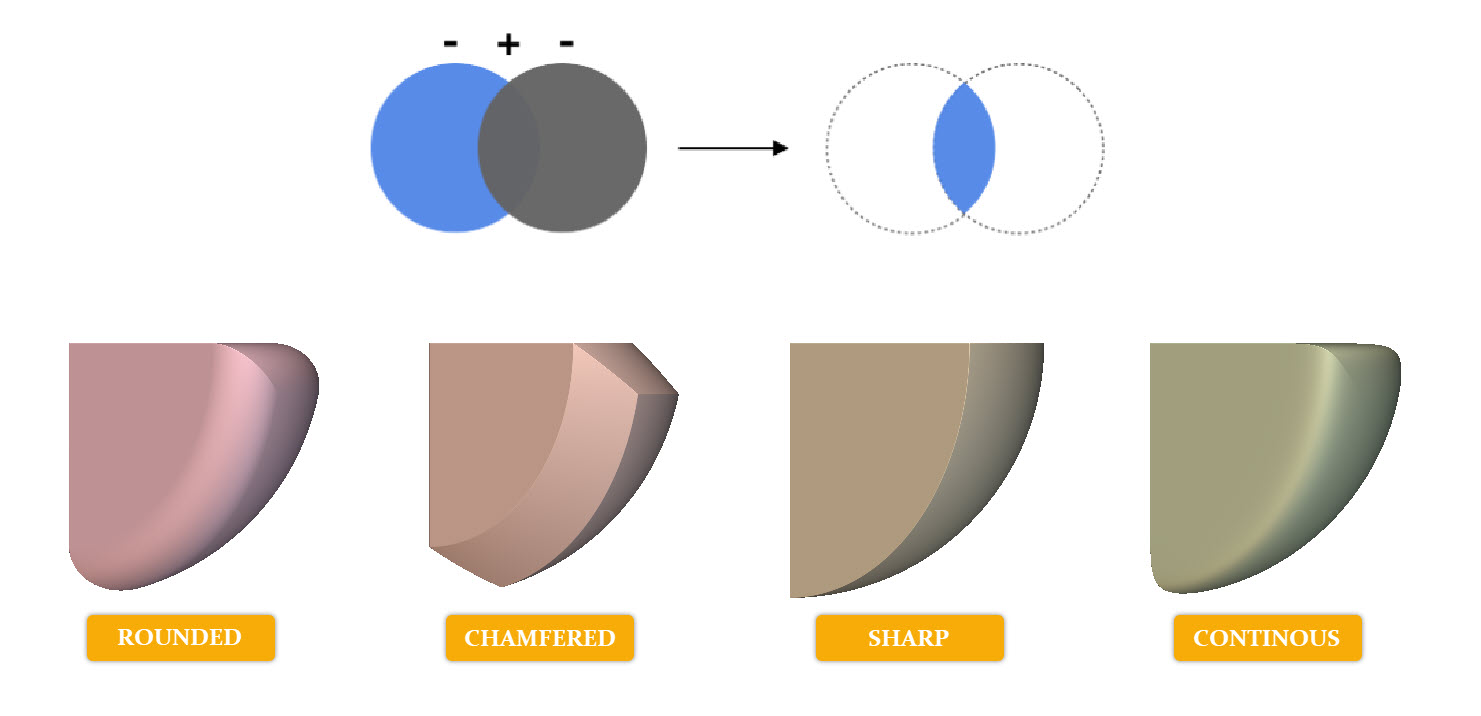
**What it does:** The **Boolean Intersect** block generates the intersecting shape of a list of Bodies. A blend is applied at the intersection of each body to control the transition between each volume, and can be sharp, rounded, continuous, or chamfered.
**Tips:**
* Apply a fillet by using the 'Rounded' Blend Type.
* Apply a chamfer by using the 'Chamfered' Blend Type.
* To retain the shape features, use the 'Sharp' Blend Type.
* To achieve a smoothed appearance between edges, use the 'Continuous' Blend Type.
* To intersect more than 2 bodies, click the + button in the upper right-hand corner of the Implicit Body List block.
* The angle of the Chamfered and Rounded blend types is dependent on the input geometries.
## Example File
Download Example: [File Name](https://storage.googleapis.com/files-learn/static/ExtendedBlockDocs/Boolean_Intersect.ntop)
***
Blend Enum, Scalar Field, Bodies
Create an Implicit Body where the input bodies spatially overlap.
### Inputs
| Name | Type | Description |
| - | - | - |
| Blend type | Blend Enum | Type of blend between the implicit bodies. |
| Blend radius | [Scalar Field](../../../../block-documentation/types/scalar-field) | Radius of the blend. This value will be ignored if "sharp" is selected. |
| Bodies | [Implicit Body List](../../../../block-documentation/types/implicit-body) | Implicit bodies to intersect. |
### Outputs
| Type |
| - |
| [Implicit Body](../../../../block-documentation/types/implicit-body) |
***
Blend Enum, Scalar Field, Bodies, 5.44.0
Create an Implicit Body where the input bodies spatially overlap.
### Inputs
| Name | Type | Description |
| - | - | - |
| Blend type | Blend Enum | Type of blend between the implicit bodies. |
| Blend radius | [Scalar Field](../../../../block-documentation/types/scalar-field) | Radius of the blend. This value will be ignored if "sharp" is selected. |
| Bodies | [Implicit Body List](../../../../block-documentation/types/implicit-body) | Implicit bodies to intersect. |
### Outputs
| Type |
| - |
| [Implicit Body](../../../../block-documentation/types/implicit-body) |
This documentation is built and hosted on [Mintlify](https://mintlify.com), a developer documentation platform.