> ## Documentation Index
> Fetch the complete documentation index at: https://docs.ntop.com/llms.txt
> Use this file to discover all available pages before exploring further.
# Displacement Restraint
***
## About this Block
**What it does:** The **Displacement Restraint** can apply a restraint over the selected boundary. **Displacement Restraint** block restrains the selected boundary entities in up to 6 degrees of freedom. The default X, Y, and Z directions are the global reference directions. The X, Y, and Z directions are chosen from a reference frame if a Frame input is provided. The corresponding degree of freedom will be unrestrained if an input is empty.
**Commons uses:**
* Boundary condition in an analysis.
* A prescribed displacement is used when the deflection/displacement allowed is known.
**Tips:**
* To prescribe a displacement using the **Displacement Restraint** block, input a displacement value you wish to move the boundary in each degree of freedom.
* *Note: The displacement input value will not be divided by the number of nodes/faces in the boundary selected.*
## Example File
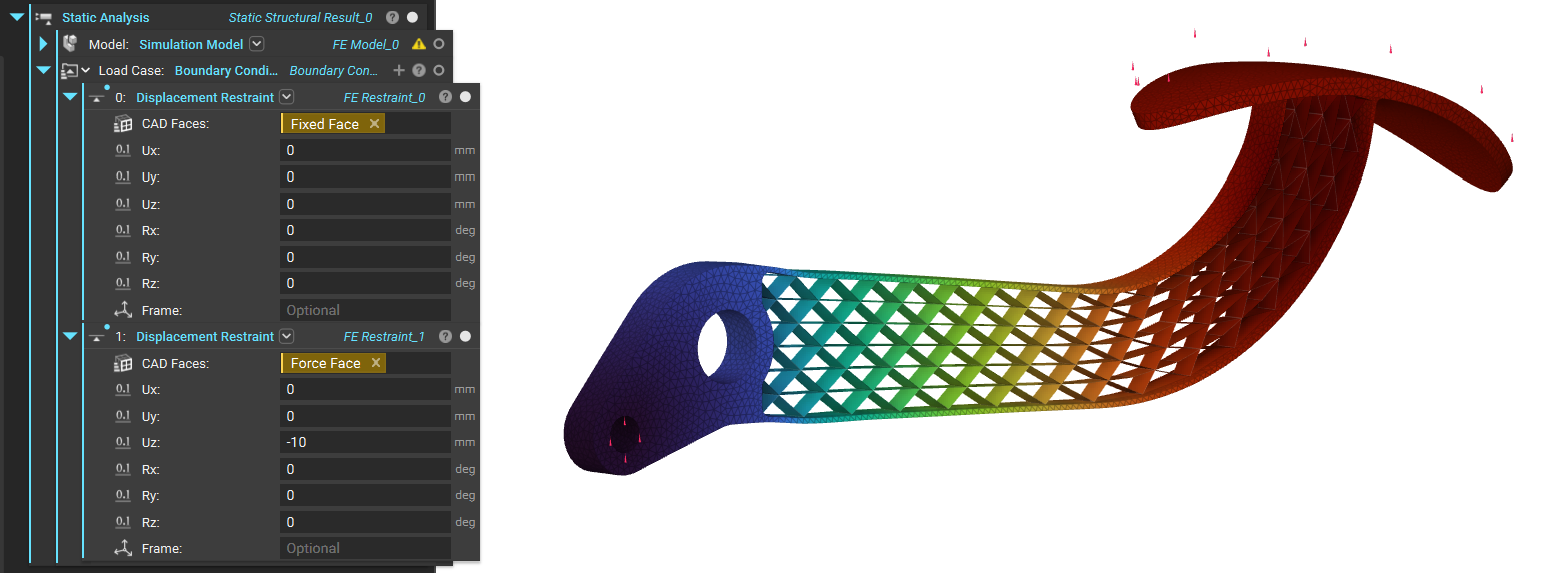
The example below shows a brake pedal simulation setup with just two displacement restraint blocks; one is used to restrain all DOFs, and the other allows Uz of -10mm.
Download Example: [Displacement Restraint](https://storage.googleapis.com/files-learn/static/ExtendedBlockDocs/displacement_restraint.ntop)
***
Boundary, Scalar, Scalar, Scalar, Scalar, Scalar, Scalar, Frame
Restrains the selected boundary entities in up to six degrees of freedom. If an input is empty, the corresponding degree of freedom will be unrestrained.
### Inputs
| Name | Type | Description |
| - | - | - |
| Boundary | [Boundary](../../../../block-documentation/types/boundary) | The boundary entities containing the nodes to restrain. |
| Ux | [Scalar](../../../../block-documentation/types/scalar) | Translational restraint along the x-axis. |
| Uy | [Scalar](../../../../block-documentation/types/scalar) | Translational restraint along the y-axis. |
| Uz | [Scalar](../../../../block-documentation/types/scalar) | Translational restraint along the z-axis. |
| Rx | [Scalar](../../../../block-documentation/types/scalar) | Rotational restraint along the x-axis. |
| Ry | [Scalar](../../../../block-documentation/types/scalar) | Rotational restraint along the y-axis. |
| Rz | [Scalar](../../../../block-documentation/types/scalar) | Rotational restraint along the z-axis. |
| Frame | [Frame](../../../../block-documentation/types/frame) | The reference frame for the input translational and rotational components. If a Frame is not specified, the components are in the global coordinate system. |
### Outputs
| Type |
| - |
| [Restraint](../../../../block-documentation/types/restraint) |
***
Cad faces, Scalar, Scalar, Scalar, Scalar, Scalar, Scalar, Frame
Restrains the selected CAD faces in up to six degrees of freedom. If an input is empty, the corresponding degree of freedom will be unrestrained.
### Inputs
| Name | Type | Description |
| - | - | - |
| Cad faces | [CAD Face List](../../../../block-documentation/types/cad-face) | The boundary CAD Faces to restrain. |
| Ux | [Scalar](../../../../block-documentation/types/scalar) | Translational restraint along the x-axis. |
| Uy | [Scalar](../../../../block-documentation/types/scalar) | Translational restraint along the y-axis. |
| Uz | [Scalar](../../../../block-documentation/types/scalar) | Translational restraint along the z-axis. |
| Rx | [Scalar](../../../../block-documentation/types/scalar) | Rotational restraint along the x-axis. |
| Ry | [Scalar](../../../../block-documentation/types/scalar) | Rotational restraint along the y-axis. |
| Rz | [Scalar](../../../../block-documentation/types/scalar) | Rotational restraint along the z-axis. |
| Frame | [Frame](../../../../block-documentation/types/frame) | The reference frame for the input translational and rotational components. If a Frame is not specified, the components are in the global coordinate system. |
### Outputs
| Type |
| - |
| [Restraint](../../../../block-documentation/types/restraint) |
This documentation is built and hosted on [Mintlify](https://mintlify.com), a developer documentation platform.